Google Chrome OS is an open source, lightweight operating system that will initially be targeted at netbooks;netbooks running Google Chrome OS will be available for consumers in the second half of 2010.
For More info in google's official blog click here
I think now Google is challenging the Microsoft's dominance!
Good development! since google's OS will be free!
Showing posts with label Google. Show all posts
Showing posts with label Google. Show all posts
Friday, August 21, 2009

Google Chrome OS leaked!
The screenshots of Google’s Chrome OS leaked, courtesy of a snap-happy Acer parts supplier and a momentarily careless Google demo rep. Apparently taken at the end of a demonstration of Chrome OS for Acer, installing the software in just 10 minutes on a formerly Vista Acer Extensa 4620Z laptop, even this early build of the platform showed its speed credentials: a desktop to desktop reboot in around 25 seconds.
I found this in a site while i was browsing! Cool features though! Will give windows a tough competition!

Only one restart was required to complete the install, and only the Google Talk app was loaded as standard. The so-called “Chrome Bar” at the bottom of the display has a blue “Start menu” button and clock, and auto-hides; the Windows key and space bring it back up, but on proper Chrome OS netbooks there’ll be a dedicated key. There’s also the possibility of adding a search box to the bar.
Two forms of navigation are present, “Exploration” and “Browser”; the former is a simple Explorer-type folder navigation, while the latter uses local search in the Chrome browser. It will also show “most visited” files. Icons can be resized, and there will be wizards – such as the internet wizard, which is described as “very quick” – to setup different features.
Of course, it would be very easy to fake screenshots like these, and only Google say whether they’re authentic or not. It’s probably too early to judge the visual side of the OS, as the Google rep apparently kept reiterating that it was a very early beta, but it looks as though simplicity is the order of the day.
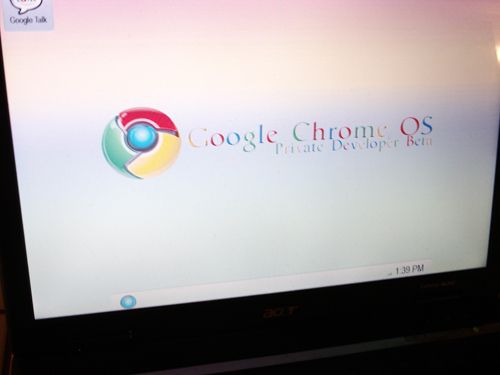
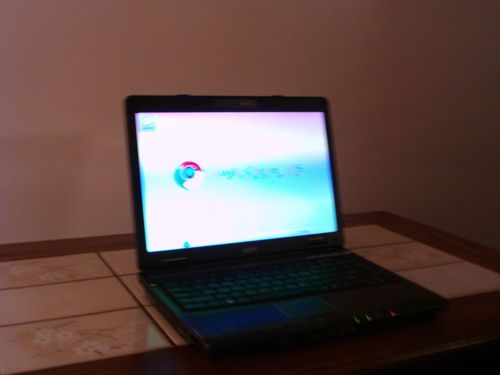
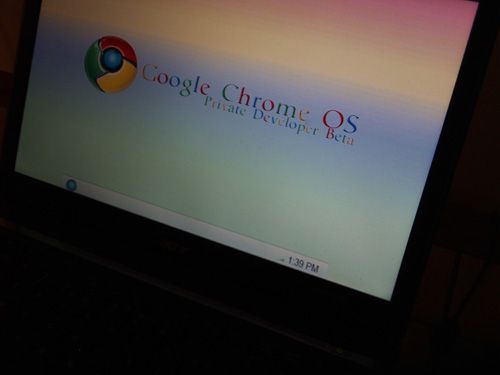
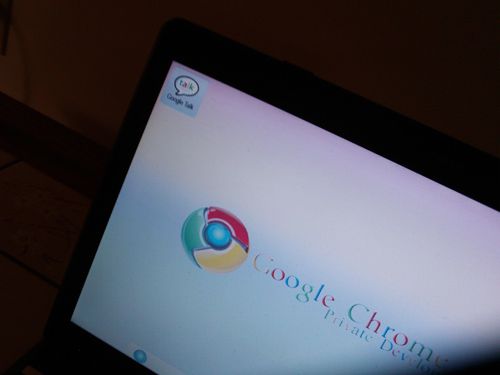
I found this in a site while i was browsing! Cool features though! Will give windows a tough competition!
Google Talk on mobile !
I've found a cool mobile applications from which you can chat using your java supported cellphone. The amazing thing is you can actually display your online status like "available", "idle" as in the case while you chat in PC ! Even i'm using it!
Here's the screenshot!
screenshot:

Download it here
Here's the screenshot!
screenshot:
Download it here
Get SMS Event Alerts from Google Calendar
Google calendar supports sending event alerts through SMS, if you have a mobile and Google account. Its very simple and you can setup this within one minute.
Login to calendar.google.com with your Google account user name and password.
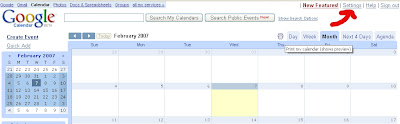
And go to the "Settings" link on the top right section of the page.
In "Calendar Settings" section click the "Notifications" link.
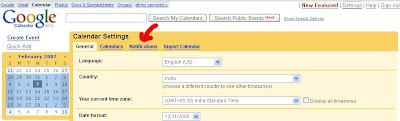
Then you will get the section for specifying your calendar events notification methods.
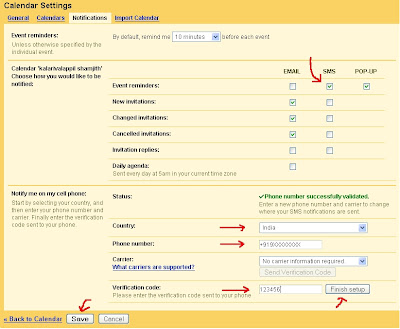
From this page you can:
Login to calendar.google.com with your Google account user name and password.
And go to the "Settings" link on the top right section of the page.

In "Calendar Settings" section click the "Notifications" link.

Then you will get the section for specifying your calendar events notification methods.

From this page you can:
- Select the "duration before the event you should be notified".
- Select the mode of reminder "EMAIL" or "SMS" or "POP-UP".
- Select your country and enter your mobile number.
- Click the "Send Verification Code" button.
- Wait for a moment you will receive your verification code in your mobile, and enter the same in the text box provided for verification code.
- Click "Finish Setup" button
- And click "Save" button to save your settings.
Wolfram Alpha v Google: Which is better?
Wolfram Alpha is designed to answer complex search queries by returning a single result. Unlike Google, which searches the entire web for the keywords contained within a search query and then returns thousands of relevant web pages, Wolfram Alpha aims to understand the question and return the correct answer by mining its vast database of information and statistics.
Perhaps unsurprisingly, Wolfram Alpha excels when it is presented with queries pertaining to specific statistics, equations or quantifiable mathematic data. The response from web users has been mixed, with some praising Wolfram Alpha for its powerful search capabilities, and others left disappointed by the answers it has returned.
Stephen Wolfram, the website’s creator, said that in the first 24 hours of Wolfram Alpha going online, he had received 10,000 feedback messages from users.
“The feedback has been insightful and entertaining,” he said. “[Users have] offered lots of suggestions, from additional domains and analysis to computations that have gone awry.”
While Wolfram Alpha handles equations and formulas with aplomb, it is of little use to those seeking answers to more general questions, such as the local showing times for the new Star Trek film (thought it does provide a cast list).
Indeed, the feedback makes for amusing reading, and demonstrates some of the areas that Wolfram Alpha will need to improve on if it’s ever going to truly compete with the giant of search, Google.
Here, are the 10 search queries and see how Wolfram Alpha performs compares to Google:
1) What is the weather in Edinburgh?
Wolfram Alpha: Wolfram Alpha’s grid-style way of presenting results is not as satisfyingly visual or immediate as Google’s take on this question. However, it does provide the current temperature, conditions, relative humidity and wind speed. Where it really comes in to its own, though, is with masses of historical weather data for the city – did you know it was 70 degrees in Edinburgh on this day in 1992?
Google: Google returns 4,340,000 results, but it also provides an at-a-glance weather report for the region, complete with current temperature and three-day forecast.
Which site is best?: For sheer ease of use, Google wins hands-down – definitely the most useful if you just want to know whether it’s rainy or sunny. Wolfram Alpha deserves praise though for automatically serving up historical facts.
Wolfram Alpha 1 Google 1
2) Who was Henry VIII?
Wolfram Alpha: Oh dear. Wolfram Alpha falls down here, providing only the most basic biographical information about King Henry VIII, such as date of birth and date of death. It tells us nothing of his involvement in the dissolution of the monasteries, his marriages, his break from the Catholic church nor any other of the nuances of history. His reign is not even contextualised in terms of who he succeeded and who succeeded him.
Google: Google returns a whopping 2,980,000 results, but fortunately, the first link is to a fantastic educational website dedicated to the Tudors, which provides plenty of background on Henry. A number of other reputable history websites also appear on the first page of results, making the whole search very straightforward.
Which site is best?: If it’s dates of "hatching and despatching" you’re after, then Wolfram Alpha comes out on top. But it lacks any historical context, even in the purest statistical or factual sense. On this occasion, Google is much more helpful.
Wolfram Alpha 0 Google 1
3) What is the population of the UK compared to the population of Australia?
Wolfram Alpha: Wolfram Alpha reports that the population of the UK according to 2007 figures was 60.8 million people, while the estimated population of Australia in the same period was 20.7 million people. The UK population is approximately 2.93 times the size of Australia.
Google: Google returns 23.8 million web pages. The first result is a Wikipedia page about England, which gives the estimated UK population as 60 million, as of 2006. The second hit is a BBC page about Australia, which lists a population of 21 million according to the UN’s 2008 figures.
Which site is best?: Wolfram Alpha gave the answer straight away, although the use of 2007 statistics rather than more current available data was a little surprising. It only took a few minutes to sift through Google’s results to find the same answer, but again, the differing age of the statistical data was potentially problematic. Wolfram Alpha came out on top here.
Wolfram Alpha 1 Google 0
4) What is 46km per hour in feet per second?
Wolfram Alpha: Lightning-quick, Wolfram Alpha tells us that 46km per hour is equal to 41.92 feet per second. It also helpfully tells us this speed in metres per second, miles per minute and even knots.
Google: Although Google can do lots of conversions and calculations straight from its search bar (eg, “1.8m in ft”), this one had it stumped at first. But remove the abbreviations and spell everything out in full, and it will immediately deliver the correct answer.
Which site is best?: Wolfram Alpha once again gets extra kudos for pre-empting further conversions you might need and giving you the answers as part of the initial results page. Google gets there eventually, although the fact that you can use abbreviations for some conversions and calculations but not for others is somewhat confusing.
Wolfram Alpha 1 Google 0
5) Plot Ai(x)
Wolfram Alpha: I’m not even sure what I’m asking Wolfram Alpha here, but it responds in an instant with two graphs, which I am sure make a great deal of sense to a maths genius.
Google: Poor old Google is as baffled by this question as I am. First it suggests I am wrong ("Did you mean: plot Y (x)?"), then it delivers 674,000 results of varying degrees of uselessness. Interestingly, though, the fourth result it returns for this question is a link through to... yes, Wolfram Alpha, thus demonstrating it would have been quicker to use the new search engine in the first place.
Which site is best?: Undoubtedly Wolfram Alpha, although Google does point you in the direction of the correct answer.
Wolfram Alpha 1 Google 0
6) Characters in Star Wars
Wolfram Alpha: It’s an epic fail for this new search engine, which responds to the question with a Spock-like “Wolfram Alpha
isn’t sure what to do with your input”.
Google: The first result is a link through to a Wikipedia page which lists (in exhausting, alphabetical detail) a complete list of Star Wars characters.
Which site is best?: Google excels at these sorts of queries, while Wolfram Alpha, despite its brains, is left trailing in its wake. Wolfram Alpha 0 Google 1
7) Highest mountain
Wolfram Alpha: Surprisingly, Wolfram Alpha returns no results for this. I realise it’s a question of semantics; trying again with the search term “tallest mountain” returns a list of the five tallest mountains (which you can expand to 10) and their height in feet. There’s no automatic option to convert this to metres or any other unit.
Google: Google is less sniffy about language, pulling up a Wikipedia list of the “highest mountains” as its first result. The list of 100 mountains includes height in feet and metres, coordinates, the mountain range in which the tallest peak appears, dates of first ascent, and a host of other pertinent trivia. It’s a far more comprehensive list than anything Wolfram Alpha came up with. Which site is best?: Somewhat unexpectedly, Google – or rather, Wikipedia – excels here, offering bags of information at the click of a mouse. Wolfram Alpha certainly answers the question (as long as you phrase it the right way), but it brings little else in the way of facts or data to the table.
Wolfram Alpha 0 Google 1
8) What’s the frequency Kenneth?
Wolfram Alpha: Wolfram’s answer to this “question” (in fact, the title of an REM song) is somehow completely wrong but utterly delightful. It interprets my question as being about the number of babies named Kenneth born in the United States – quite literally, the frequency of Kenneths per year.
Google: Google by no means provides the definitive answer, but it does link through to videos of the REM song, a Wikipedia entry telling the story behind the track, and links to copious lyrics sites.
Which site is best?: Google gets closest to answering this vexing question, but Wolfram Alpha, I’m afraid, doesn’t even recognise there’s a song by this name.
Wolfram Alpha 0 Google 1
9) 1-5795-5008-8
Wolfram Alpha: Immediately recognises this as a bar code, and generates an image, as well as its corresponding 13-digit ISBN number.
Google: Leaps in to calculation mode, interpreting the dashes between numbers as minus signs, and coming up with an answer of -10,810. Interestingly, though, the first link in the results list it generates is to Wolfram Alpha.
Which site is best?: Wolfram Alpha is on the money within seconds. Google gives it a good go, but is wide of the mark.
Wolfram Alpha 1 Google 0
10) Best pizza in London
Wolfram Alpha: Even geeks need to eat every now and again, but Wolfram Alpha is no help at finding the best place in London to get a deep pan pizza.
Google: Google returns more than 1.6 million possible answers, with plenty of links to restaurant reviews and internet forums where people have recommended good pizza restaurants. It doesn’t give a definitive answer, but with a little digging, web users will be able to quickly find somewhere to go for dinner.
Which site is best?: Google wins this one, but we still eagerly await the day it provides a precise answer to these sort of questions rather than just tantalising possibilities.
Wolfram Alpha 0 Google 1
Final score: Wolfram Alpha 5 Google 6
Conclusion: It’s clear that Wolfram Alpha excels at complex number-crunching, computation and calculations, while Google is better at popular culture, location-awareness and crowdsourcing. Wolfram Alpha is certainly not ready to replace Google, but there will be plenty of occasions where web users are better-served “Wolframing” the query rather than Googling it.
Wednesday, August 19, 2009
Get Google AdSense Approval Quickly
Many publishers have a hard time getting approved into the Google AdSense program. In fact, Google recently posted a blog entry named Before you apply to AdSense. In that blog post, Google explains the ways to apply and some of the criteria that must be met to get approval into the program.
If that blog post doesn't help you get into the Google AdSense program then maybe a DigitalPoint Forums thread would.
In that thread, one member claimed that if you register at HubPages and then click on "account settings" and then "affiliates." You can sign up for Google AdSense within HubPages. HubPages says:
This implies that creating a HubPage account will guarantee acceptance into Google AdSense.
Some of the forums members are giving this theory a try. It would make sense that the same applies to Google's Blogger accounts or Google Pages.
Forum discussion at DigitalPoint Forums
If that blog post doesn't help you get into the Google AdSense program then maybe a DigitalPoint Forums thread would.
In that thread, one member claimed that if you register at HubPages and then click on "account settings" and then "affiliates." You can sign up for Google AdSense within HubPages. HubPages says:
When you create a user account with HubPages, we’ll automatically create the Google Adsense program for you. Just answer a few simple questions and you’ll be ready to go.
This implies that creating a HubPage account will guarantee acceptance into Google AdSense.
Some of the forums members are giving this theory a try. It would make sense that the same applies to Google's Blogger accounts or Google Pages.
Forum discussion at DigitalPoint Forums
Easy way to obtain Approval for google adsense
If you are a newbie Blogger or Webmaster and if you are a applying for adsense to monetize your site, then you might have faced the situation where Google asks you to wait for atleast six months to qualify for your adsense account and get approved to show ad slots in your site. 6 Months is too much a long wait and there is no need to lose adsense dollars waiting six months.
What we found is that Google is not nearly as picky as they make themselves sound to be. The trick is to make your site in such a way that you are just providing content; we have found that the less selling you do on your approval site, the better.
There are 3 Main elements that you should focus on when getting Approved by Google Adsense
1. Site look and feel – Not that Google wants a $10,000 professionally designed website, but they also don’t want some piece of junk. Make sure to at LEAST have a presentable website – even if it is just a few tables and a solid background color. Avoid using tacky backgrounds or unprofessional color contrasts.
2. Content – The most important – Google believes in content. If you try to get a website with just a few pages approved, I don’t think you will have any luck. You need to have at least 15-20 pages, preferably, 15-20 pages of articles/resources, a.k.a. content.
3. Traffic – Many experts say that Google Adsense team looks to see what kind of traffic you have and that they do not approve new sites with no traffic. My experience says that these experts are FULL of it. BUT, just to be safe, before you submit your site for approval – try to get your site some traffic.
Here are useful tips you need to make the entire Adsense Approval process Easier and Quicker How to Get Approved by Google Adsense without wait for 6 six months - Make Account Active
1. Get content from article directories like goarticles– just put those articles in your site, getting 15-20 is easy.
2. Before you submit your site for approval, post at some forums with your website’s link in the signature file – this will help you get some immediate traffic.
3. Make a very simple website with 15-20 articles, a contact us page, a privacy policy and the typical disclaimer.
That’s it – you’re ready to get approved for Google Adsense. (Pic Show Adsense Pin Envelope you will get after 6 months)
I know this sound too easy, but trust me, it is. And remember, if you do not get approved, you can always fix things and try again.
What we found is that Google is not nearly as picky as they make themselves sound to be. The trick is to make your site in such a way that you are just providing content; we have found that the less selling you do on your approval site, the better.
There are 3 Main elements that you should focus on when getting Approved by Google Adsense
1. Site look and feel – Not that Google wants a $10,000 professionally designed website, but they also don’t want some piece of junk. Make sure to at LEAST have a presentable website – even if it is just a few tables and a solid background color. Avoid using tacky backgrounds or unprofessional color contrasts.
2. Content – The most important – Google believes in content. If you try to get a website with just a few pages approved, I don’t think you will have any luck. You need to have at least 15-20 pages, preferably, 15-20 pages of articles/resources, a.k.a. content.
3. Traffic – Many experts say that Google Adsense team looks to see what kind of traffic you have and that they do not approve new sites with no traffic. My experience says that these experts are FULL of it. BUT, just to be safe, before you submit your site for approval – try to get your site some traffic.
Here are useful tips you need to make the entire Adsense Approval process Easier and Quicker How to Get Approved by Google Adsense without wait for 6 six months - Make Account Active
1. Get content from article directories like goarticles– just put those articles in your site, getting 15-20 is easy.
2. Before you submit your site for approval, post at some forums with your website’s link in the signature file – this will help you get some immediate traffic.
3. Make a very simple website with 15-20 articles, a contact us page, a privacy policy and the typical disclaimer.
That’s it – you’re ready to get approved for Google Adsense. (Pic Show Adsense Pin Envelope you will get after 6 months)
I know this sound too easy, but trust me, it is. And remember, if you do not get approved, you can always fix things and try again.
The Top 10 Alternatives to Google Adsense
Google AdSense is the current leader in content-sensitive web-based marketing. Webmasters can place Google AdSense JavaScript code on their web pages in order to allow Google's servers to show context sensitive advertisements (Google Adwords). The left hand side of this page shows an example of a Google AdSense skyscraper displaying a text or image ad.
Google's terms and conditions are very strict such that many web publishers cannot use adsense adverts on their sites. They are either denied from joining the Google AdSense program, or in a situation that is becoming more and more common do not wish to do business with Google. A number of publishers are also finding their Adsense accounts are being disabled for reasons that are completely beyond their control. The problem is that most of the alternatives to Google's Adsense are pretty useless. Most of the good ones (such as doubleclick) are only interested in very large volume customers and so are not interested in the little guy with his blog who wants to earn a small income on the side. For this reason I have compiled my Top 10 alternatives to Google's Adsense that are ideal for the small time publisher.
If you are a advertiser then you may be interested in these best alternatives to adwords.
Has your adsense account been disabled? Then try these top 10 alternatives.
Note: The descriptions are based on personal experience and do not represent any form of endorsement.
1) AdBrite
AdBrite, is currently one of the best alternatives there is to Google's adsense. While they do not offer the same large selection of ad formats that Clicksor and Google Adsense provide you they do offer the most commonly used ones. In addition they offer inline page links with have some great click through ratios as well as interstitial full page ads which offer an excellent way to monetize all traffic to your site not just traffic that clicks on your ads. Their payouts are also very competitive. They have more relaxed terms and conditions than Adsense and are much more accepting of smaller publishers including bloggers.
If you're a publisher, use AdBrite to set your own ad rates, and approve or reject every ad that's purchased for your site or just have AdBrite auto accept ever ad. AdBrite enables you to instantly sell ads to your visitors via a "Your Ad Here" link, in addition to selling through AdBrite's marketplace and sales team.
Revenue is typically split 75/25 in your favor. Through a small snippet of HTML placed on your site, they handle serving, scheduling, billing, customer service, and sales. About half of AdBrite's sales are generated from the marketplace and sales team, while the other half are generated from users clicking "Your Ad Here" on your website.
While AdBrite can provide publishers with more revenue and better ads than traditional ad networks such as Google AdSense, they work fine along-side them as a way for you to generate additional ad revenue by selling ads directly to your visitors -- something the other ad systems don't do. Ad Brite also lets you select your own minimum bid prices and give you the option of showing an alternative ad service such as Clicksor when bid prices fall below your minimum.
If you're using AdBrite on your website you also have the option to turn off AdBrite's "run-of-network ads" and AdBrite will only display ads that have been approved by you allowing you to prevent competitors ads being shown on your site. If you have no ads running, AdBrite will display nothing but "Your Ad Here" or your alternative ad provider.
Note, from my experiences it can take a day or so from when you signup with AdBrite and put their code on your website to actually start seeing relevant ads showing up. So if you see the message "Advertize on this site" just be patient and give it a day or so and you should start seeing relevant ads showing up.
AdBrite also accepts Blogs and Bloggers as sites so if you are fed up with other programs turning you down because their terms and conditions restrict Blogs try AdBrite.
2) Clicksor
Clicksor is one of the current leaders of the small publisher Adsense competition. They have payouts upto a market leading 85% and unlike a number of alternatives the cost per click bid values are high enough that you can earn a decent income. They are also, in my experience, much more tollerant than Google. Their terms and conditions suggest that you should only place one copy of their code on a page but as long as you only place a single pop-up or DHTML code on a page they seem happy to let you place many context sensitive ad blocks on a single site.
Clicksor also has a big advantage over a number of the lower ranked alternatives on this site in that their ads are truly context sensitive. Thus while you can provide keywords they have technology that will also show ads targeted to the content of your site. This means your visitors are exposed to ads of the same subject as they were searching for when they reached your site and thus vastly increases the click thru ratio and thus your sites earning potential. The context sensitive nature also saves you the hassle of having to specify keywords for all of your sites and decide in advance what people might be looking for.
The online stats provided by Clicksor are not perfect but they are enough for you to keep track of the trends with your site. They also allow you to add as many sites / domains as you want under a single account. You also only need the root page of your site approved. Once this is done you can place ads on all of your sub pages.
The payment schedule with Clicksor is also much better geared to the small site owner. In any pay period in which your earnings exceed $50.00 ($20.00 with PayPal), payments are made either by check or instantly through PayPal ($20.00 minimum for PayPal). Revenue totaling less that $50 (PP $20) will rolled into the following period. The pay period is based on a 15 day schedule so you can get paid much more frequently. Clicksor also do not require a Social Security (SSN) or Individual Tax Identity Number (ITIN) to join and so while this 'technically' does not help US site owners with their tax liability it does make it much easier for non US citizens to join up and start earning revenue.
Advert wise Clicksor features:
Multiple formats available including text, image and animated ads.
Text Links
Image Ads
Flash Ads
Animation Ads
Banners
Pop unders
Interstitial Ads (NEW)
Dynamic (DHTML) highlighting
Click here to visit Clicksor's website and sign up for an account to try it out. There is no obligation and no fees ever. Note, once you start adding the advert code to your site it can take up to 24 hours for Clicksor to get up to speed as it were so initially you may see some ads that don't appear to be relevant. Once their contextual engine kicks in, however, the relevance quickly improves.
3) Bidvertiser
Bidvertiser can be a useful alternative to Google and offer some intriguing ad formats including what they refer to as free design. This lets you specify the look and dimensions of your text ads. While a useful feature I have not investigated how well it works but imagine that while it sounds good on paper it could result in lower priced ads being displayed. I.e. most advertisers will probably want to keep control of the layout of their ads and so turn off support for Free design ads.
Bidvertizer pays you either in $25.00 increments by check or $10.00 increments by PayPal.
Customize the layout of your ads: BidVertiser gives you a simple point-and-click tool to help you customize the layout of the ads to fit your site's look and feel, in order to retain the high quality of your website. Bidvertizer also offers the opportunity to block unwanted ads. The reports provided by Bidvertiser are adequate but not outstanding. The only real problem is that they can be picky with who they accept into their program and can be quick to ban users whose websites show what may be perfectly valid fluctuating visitor behaviour. Click here to visit Bidvertiser's website where you can either sign up as a publisher (show peoples ads on your site) or as an advertiser (show your ads on other sites).
As an advertiser you can get $20 in free clicks by following this link: Bidvertiser Advertise and get $20 in free clicks.
4) Chitika
Chitika - The Leader in Impulse Merchandising
Chitika (pronounced CHIH-tih-ka) was founded in 2003 and is the industry's leading impulse merchandising company. Chitika was founded in May 2003 and is based in Massachusetts. Chitika (pronounced CHIH-tih-ka) helps web publishers generate revenue using innovative publisher-side advertising and merchandising solutions and services.
Chitika doesn't really stand alone as a single advertising solution but instead provides you with a way to compliment your existing advertising / publishing program with some additional Ad Units which are altogether different from the standard ad boxes, pop-unders etc that everybody else provides. Instead of displaying these 'industry standard' advert boxes with text and image ads that all look the same they instead provide active boxes that show targeted products from different manufacturers. If you run a blog for example and discuss a product you may find the chitika box showing links for this product and competitors products. If people purchase these products you get a paid a commission. This is referred to as impulse marketing in the form of Premium Ad Units (eMinimalls). Feel free to give it a try although I think the ideal use of this service would be as a compliment to another advertizers service. E.g. you could show Clicksor context sensitive ads on your site and then compliment these with Chitika's eMinimalls.
For advertisers and media buyers, Chitika is a proven channel for targeting on-line consumers and qualified buyers. For all publishers, Chitika is an easy-to-use platform for earning daily ad revenue. If you visit a site showing Chitika's ads from a search engine then the Chitika premium ad unit kicks in showing you ads that are specific to your searching - otherwise you can have it show an alternative ad provider, such as adsense, or you can just have it collapse away to show nothing.
Chitika allows you to display targeted products based on what people searched for to get to your page and you get paid for clicks. It provides a robust comparative shopping experience for your visitors. Visitors will love the interactive search code -- and it makes you money
Click here to visit Chitika's website and sign up today.
5) AdToll
AdToll pays on a CPC basis. Their user interface is great and navigating through the user panel is both easy and pleasant. Payments are available via Cheque, Paypal, ePassporte and Wire/Bank Transfer. It is also possible to use the revenue you earn as a publisher to advertise your website further. Such integration is something that is entirely missing from Google's adsense-adwords.
The newest technology by AdToll is a Peel Away Ad technology that shows a peel on the top right hand side of a web site. When the mouse moves over the peel it opens smoothly to reveal the advert within. This new ad format allows you to make use of the lesser used, yet highly visible top corners of web sites. It is very non intrusive to the site visitor. Since it uses a small amount of space, it is efficient use of web site real estate. An additional plus is that such a new advertising format always draws curious clicks for visitors.
Click here to visit AdToll and sign up for a no obligation account today.
6) Exit Junction
Exit Junction is relatively new and, I believe, a spin off from the now defunct Revenue Pilot. While Revenue Pilot has stopped running, however, Exit Junction is going from strength to strength. Exit Junction offers a unique approach to advertising that is compatible with all the other Ad Networks included Google Adsense. The key to Exit junction is that they focus on showing ads to users as they leave your site rather than as they arrive or as they browse. This approach offers you an additional way to monetize your traffic and also capture ad revenue from those that stumble upon your site from a search engine and then immediately leave.
By adding a small piece of Exit Junction code to the header section of your site users are shown an advert as they hit the back button. For example, if a user came to your site from a Google search and then immediately hit the back button to return to that search they would be shown an Exit Junction Ad in between your page and the Google search and you get paid for this impression. The ad is directly targeted to the search term that brought the visitor to your site in the first place. Hence Exit Junction is an ideal way of complimenting your existing ad services and so increasing your sites revenue without having to switch from your current ad provider.
Exit junction also covers all countries. You get paid for all traffic exiting you site regardless of its origin.
They offer fee free payout via Check or PayPal with earnings of as little as $25 on a monthly basis.
Click here to signup with Exit Junction for a free no obligation account.
7) Yahoo Publisher Network
Yahoo are currently playing catch up to Google and are trying to release their own context sensitive advertising service. This promises to be an excellent alternative to Google Adsense but in reality is likely to be a simple copy with the same restrictive terms and conditions as Google, including $100 minimums on payouts. The system seems to have been in beta test for several years now, perhaps explaining why Yahoo as a company is suffering. Unfortunately while you can visit their site and sign up to register for an account don't expect to actually hear back from them. They are either extremely selective or are simply not accepting new publishers and advertisers, either way they won't even bother to get back to you to let you know this and most applicants won't even receive a reply saying their application has been rejected. Thus until it goes live and it becomes clear what type of website owners Yahoo will be targeting I cannot place it any higher in this list.
Advert wise Yahoo Publisher Network will feature:
Display ads related to the content on your site. You'll earn revenue from qualified clicks.
Integrate other Yahoo! services into your web site, including Add to My Yahoo! (RSS), Y!Q and much more to come...
This beta program is just the beginning. Our mission is to deliver products and services based on the needs of the publishing community.
8) TargetPoint
Targetpoint's services are particularly publisher-oriented, you have absolute control over the appearance of your ads. They provide supervision over ad content. The payouts tend to be reasonable but they can be quite choosey regarding which sites are accepted.
Advert wise Target Point provide:
Adpoint generates content-relevant, revenue-evaluated ads.
Exitpoint helps utilizing the full capacity web exit traffic.
Imagepoint serves visual ads. Known to the rest of the world as Image ads.
Underpoint serves pop-under ad windows.
Searchpoint (beta) features enhanced search capabilities, which enhance your users� experience and generate additional profit.
Registration is free and they pay back a minimum of 60% of the total on-click revenue. Payment options include Bank checks, PayPal and Wire transfers (if eligible).
9) FastClick (Now known as ValueClick)
At first look FastClick would appear to be one of the better alternatives to Google's Adsense however, they are one of many online advertising companies that tend to favor the large customers. You'd think companies would have learnt from Google's success and accepted that the way to make money is to target both large and small. Remember Excite? They went the way of the dodo because they only targeted the top 100 companies rather than the small guys who can't afford large TV adverts and have to advertise on the Internet instead. Anyway, I digress. If you can get yourself accepted to FastClick (now called ValueClick) then you will probably be able to run some reasonably high paying adverts on your site but most small website owners will find that FastClick simply aren't interested.
Advertising wise FastClick (ValueClick) offer an industry-average 65-percent monthly payout on all advertising revenue your website generates. Fastclick pays by the 25th of the month for the previous month by check or PayPal.
Formats include:
Text Ads
Image Ads
Interstitial
Pop-Under
InVue
10) ClickThruTraffic
Not the best alternative but if you can't get accepted by any of the above you can always try these guys. They claim that you will earn between 6 and 20 cents everytime a surfer clicks on an advertisement on your site but in reality I think you are more likely to see rates around the 0.5c to 2c range. However, feel free to try it out and see how you get on. Advert wise they offer text links, buttons and banners.
You can find some suggestions on optimizing ad layouts here. Click here for an unofficial list of high paying keywords.. Click here for a comprehensive list of Google Adsense Alternatives.
Note:- Google every alternative and find the link to register, we do not want to spread any adsense alternative link here.
Google's terms and conditions are very strict such that many web publishers cannot use adsense adverts on their sites. They are either denied from joining the Google AdSense program, or in a situation that is becoming more and more common do not wish to do business with Google. A number of publishers are also finding their Adsense accounts are being disabled for reasons that are completely beyond their control. The problem is that most of the alternatives to Google's Adsense are pretty useless. Most of the good ones (such as doubleclick) are only interested in very large volume customers and so are not interested in the little guy with his blog who wants to earn a small income on the side. For this reason I have compiled my Top 10 alternatives to Google's Adsense that are ideal for the small time publisher.
If you are a advertiser then you may be interested in these best alternatives to adwords.
Has your adsense account been disabled? Then try these top 10 alternatives.
- AdBrite
- Clicksor
- Bidvertiser
- Chitika
- AdToll
- Exit Junction
- Yahoo Publisher Network
- Target Point
- Fastclick
- ClickThruTraffic
Note: The descriptions are based on personal experience and do not represent any form of endorsement.
1) AdBrite
AdBrite, is currently one of the best alternatives there is to Google's adsense. While they do not offer the same large selection of ad formats that Clicksor and Google Adsense provide you they do offer the most commonly used ones. In addition they offer inline page links with have some great click through ratios as well as interstitial full page ads which offer an excellent way to monetize all traffic to your site not just traffic that clicks on your ads. Their payouts are also very competitive. They have more relaxed terms and conditions than Adsense and are much more accepting of smaller publishers including bloggers.
If you're a publisher, use AdBrite to set your own ad rates, and approve or reject every ad that's purchased for your site or just have AdBrite auto accept ever ad. AdBrite enables you to instantly sell ads to your visitors via a "Your Ad Here" link, in addition to selling through AdBrite's marketplace and sales team.
Revenue is typically split 75/25 in your favor. Through a small snippet of HTML placed on your site, they handle serving, scheduling, billing, customer service, and sales. About half of AdBrite's sales are generated from the marketplace and sales team, while the other half are generated from users clicking "Your Ad Here" on your website.
While AdBrite can provide publishers with more revenue and better ads than traditional ad networks such as Google AdSense, they work fine along-side them as a way for you to generate additional ad revenue by selling ads directly to your visitors -- something the other ad systems don't do. Ad Brite also lets you select your own minimum bid prices and give you the option of showing an alternative ad service such as Clicksor when bid prices fall below your minimum.
If you're using AdBrite on your website you also have the option to turn off AdBrite's "run-of-network ads" and AdBrite will only display ads that have been approved by you allowing you to prevent competitors ads being shown on your site. If you have no ads running, AdBrite will display nothing but "Your Ad Here" or your alternative ad provider.
Note, from my experiences it can take a day or so from when you signup with AdBrite and put their code on your website to actually start seeing relevant ads showing up. So if you see the message "Advertize on this site" just be patient and give it a day or so and you should start seeing relevant ads showing up.
AdBrite also accepts Blogs and Bloggers as sites so if you are fed up with other programs turning you down because their terms and conditions restrict Blogs try AdBrite.
2) Clicksor
Clicksor is one of the current leaders of the small publisher Adsense competition. They have payouts upto a market leading 85% and unlike a number of alternatives the cost per click bid values are high enough that you can earn a decent income. They are also, in my experience, much more tollerant than Google. Their terms and conditions suggest that you should only place one copy of their code on a page but as long as you only place a single pop-up or DHTML code on a page they seem happy to let you place many context sensitive ad blocks on a single site.
Clicksor also has a big advantage over a number of the lower ranked alternatives on this site in that their ads are truly context sensitive. Thus while you can provide keywords they have technology that will also show ads targeted to the content of your site. This means your visitors are exposed to ads of the same subject as they were searching for when they reached your site and thus vastly increases the click thru ratio and thus your sites earning potential. The context sensitive nature also saves you the hassle of having to specify keywords for all of your sites and decide in advance what people might be looking for.
The online stats provided by Clicksor are not perfect but they are enough for you to keep track of the trends with your site. They also allow you to add as many sites / domains as you want under a single account. You also only need the root page of your site approved. Once this is done you can place ads on all of your sub pages.
The payment schedule with Clicksor is also much better geared to the small site owner. In any pay period in which your earnings exceed $50.00 ($20.00 with PayPal), payments are made either by check or instantly through PayPal ($20.00 minimum for PayPal). Revenue totaling less that $50 (PP $20) will rolled into the following period. The pay period is based on a 15 day schedule so you can get paid much more frequently. Clicksor also do not require a Social Security (SSN) or Individual Tax Identity Number (ITIN) to join and so while this 'technically' does not help US site owners with their tax liability it does make it much easier for non US citizens to join up and start earning revenue.
Advert wise Clicksor features:
Multiple formats available including text, image and animated ads.
Text Links
Image Ads
Flash Ads
Animation Ads
Banners
Pop unders
Interstitial Ads (NEW)
Dynamic (DHTML) highlighting
Click here to visit Clicksor's website and sign up for an account to try it out. There is no obligation and no fees ever. Note, once you start adding the advert code to your site it can take up to 24 hours for Clicksor to get up to speed as it were so initially you may see some ads that don't appear to be relevant. Once their contextual engine kicks in, however, the relevance quickly improves.
3) Bidvertiser
Bidvertiser can be a useful alternative to Google and offer some intriguing ad formats including what they refer to as free design. This lets you specify the look and dimensions of your text ads. While a useful feature I have not investigated how well it works but imagine that while it sounds good on paper it could result in lower priced ads being displayed. I.e. most advertisers will probably want to keep control of the layout of their ads and so turn off support for Free design ads.
Bidvertizer pays you either in $25.00 increments by check or $10.00 increments by PayPal.
Customize the layout of your ads: BidVertiser gives you a simple point-and-click tool to help you customize the layout of the ads to fit your site's look and feel, in order to retain the high quality of your website. Bidvertizer also offers the opportunity to block unwanted ads. The reports provided by Bidvertiser are adequate but not outstanding. The only real problem is that they can be picky with who they accept into their program and can be quick to ban users whose websites show what may be perfectly valid fluctuating visitor behaviour. Click here to visit Bidvertiser's website where you can either sign up as a publisher (show peoples ads on your site) or as an advertiser (show your ads on other sites).
As an advertiser you can get $20 in free clicks by following this link: Bidvertiser Advertise and get $20 in free clicks.
4) Chitika
Chitika - The Leader in Impulse Merchandising
Chitika (pronounced CHIH-tih-ka) was founded in 2003 and is the industry's leading impulse merchandising company. Chitika was founded in May 2003 and is based in Massachusetts. Chitika (pronounced CHIH-tih-ka) helps web publishers generate revenue using innovative publisher-side advertising and merchandising solutions and services.
Chitika doesn't really stand alone as a single advertising solution but instead provides you with a way to compliment your existing advertising / publishing program with some additional Ad Units which are altogether different from the standard ad boxes, pop-unders etc that everybody else provides. Instead of displaying these 'industry standard' advert boxes with text and image ads that all look the same they instead provide active boxes that show targeted products from different manufacturers. If you run a blog for example and discuss a product you may find the chitika box showing links for this product and competitors products. If people purchase these products you get a paid a commission. This is referred to as impulse marketing in the form of Premium Ad Units (eMinimalls). Feel free to give it a try although I think the ideal use of this service would be as a compliment to another advertizers service. E.g. you could show Clicksor context sensitive ads on your site and then compliment these with Chitika's eMinimalls.
For advertisers and media buyers, Chitika is a proven channel for targeting on-line consumers and qualified buyers. For all publishers, Chitika is an easy-to-use platform for earning daily ad revenue. If you visit a site showing Chitika's ads from a search engine then the Chitika premium ad unit kicks in showing you ads that are specific to your searching - otherwise you can have it show an alternative ad provider, such as adsense, or you can just have it collapse away to show nothing.
Chitika allows you to display targeted products based on what people searched for to get to your page and you get paid for clicks. It provides a robust comparative shopping experience for your visitors. Visitors will love the interactive search code -- and it makes you money
Click here to visit Chitika's website and sign up today.
5) AdToll
AdToll pays on a CPC basis. Their user interface is great and navigating through the user panel is both easy and pleasant. Payments are available via Cheque, Paypal, ePassporte and Wire/Bank Transfer. It is also possible to use the revenue you earn as a publisher to advertise your website further. Such integration is something that is entirely missing from Google's adsense-adwords.
The newest technology by AdToll is a Peel Away Ad technology that shows a peel on the top right hand side of a web site. When the mouse moves over the peel it opens smoothly to reveal the advert within. This new ad format allows you to make use of the lesser used, yet highly visible top corners of web sites. It is very non intrusive to the site visitor. Since it uses a small amount of space, it is efficient use of web site real estate. An additional plus is that such a new advertising format always draws curious clicks for visitors.
Click here to visit AdToll and sign up for a no obligation account today.
6) Exit Junction
Exit Junction is relatively new and, I believe, a spin off from the now defunct Revenue Pilot. While Revenue Pilot has stopped running, however, Exit Junction is going from strength to strength. Exit Junction offers a unique approach to advertising that is compatible with all the other Ad Networks included Google Adsense. The key to Exit junction is that they focus on showing ads to users as they leave your site rather than as they arrive or as they browse. This approach offers you an additional way to monetize your traffic and also capture ad revenue from those that stumble upon your site from a search engine and then immediately leave.
By adding a small piece of Exit Junction code to the header section of your site users are shown an advert as they hit the back button. For example, if a user came to your site from a Google search and then immediately hit the back button to return to that search they would be shown an Exit Junction Ad in between your page and the Google search and you get paid for this impression. The ad is directly targeted to the search term that brought the visitor to your site in the first place. Hence Exit Junction is an ideal way of complimenting your existing ad services and so increasing your sites revenue without having to switch from your current ad provider.
Exit junction also covers all countries. You get paid for all traffic exiting you site regardless of its origin.
They offer fee free payout via Check or PayPal with earnings of as little as $25 on a monthly basis.
Click here to signup with Exit Junction for a free no obligation account.
7) Yahoo Publisher Network
Yahoo are currently playing catch up to Google and are trying to release their own context sensitive advertising service. This promises to be an excellent alternative to Google Adsense but in reality is likely to be a simple copy with the same restrictive terms and conditions as Google, including $100 minimums on payouts. The system seems to have been in beta test for several years now, perhaps explaining why Yahoo as a company is suffering. Unfortunately while you can visit their site and sign up to register for an account don't expect to actually hear back from them. They are either extremely selective or are simply not accepting new publishers and advertisers, either way they won't even bother to get back to you to let you know this and most applicants won't even receive a reply saying their application has been rejected. Thus until it goes live and it becomes clear what type of website owners Yahoo will be targeting I cannot place it any higher in this list.
Advert wise Yahoo Publisher Network will feature:
Display ads related to the content on your site. You'll earn revenue from qualified clicks.
Integrate other Yahoo! services into your web site, including Add to My Yahoo! (RSS), Y!Q and much more to come...
This beta program is just the beginning. Our mission is to deliver products and services based on the needs of the publishing community.
8) TargetPoint
Targetpoint's services are particularly publisher-oriented, you have absolute control over the appearance of your ads. They provide supervision over ad content. The payouts tend to be reasonable but they can be quite choosey regarding which sites are accepted.
Advert wise Target Point provide:
Adpoint generates content-relevant, revenue-evaluated ads.
Exitpoint helps utilizing the full capacity web exit traffic.
Imagepoint serves visual ads. Known to the rest of the world as Image ads.
Underpoint serves pop-under ad windows.
Searchpoint (beta) features enhanced search capabilities, which enhance your users� experience and generate additional profit.
Registration is free and they pay back a minimum of 60% of the total on-click revenue. Payment options include Bank checks, PayPal and Wire transfers (if eligible).
9) FastClick (Now known as ValueClick)
At first look FastClick would appear to be one of the better alternatives to Google's Adsense however, they are one of many online advertising companies that tend to favor the large customers. You'd think companies would have learnt from Google's success and accepted that the way to make money is to target both large and small. Remember Excite? They went the way of the dodo because they only targeted the top 100 companies rather than the small guys who can't afford large TV adverts and have to advertise on the Internet instead. Anyway, I digress. If you can get yourself accepted to FastClick (now called ValueClick) then you will probably be able to run some reasonably high paying adverts on your site but most small website owners will find that FastClick simply aren't interested.
Advertising wise FastClick (ValueClick) offer an industry-average 65-percent monthly payout on all advertising revenue your website generates. Fastclick pays by the 25th of the month for the previous month by check or PayPal.
Formats include:
Text Ads
Image Ads
Interstitial
Pop-Under
InVue
10) ClickThruTraffic
Not the best alternative but if you can't get accepted by any of the above you can always try these guys. They claim that you will earn between 6 and 20 cents everytime a surfer clicks on an advertisement on your site but in reality I think you are more likely to see rates around the 0.5c to 2c range. However, feel free to try it out and see how you get on. Advert wise they offer text links, buttons and banners.
You can find some suggestions on optimizing ad layouts here. Click here for an unofficial list of high paying keywords.. Click here for a comprehensive list of Google Adsense Alternatives.
Note:- Google every alternative and find the link to register, we do not want to spread any adsense alternative link here.
Get Google AdSense Approval Quickly
Many publishers have a hard time getting approved into the Google AdSense program. In fact, Google recently posted a blog entry named Before you apply to AdSense. In that blog post, Google explains the ways to apply and some of the criteria that must be met to get approval into the program.
If that blog post doesn't help you get into the Google AdSense program then maybe a DigitalPoint Forums thread would.
In that thread, one member claimed that if you register at HubPages and then click on "account settings" and then "affiliates." You can sign up for Google AdSense within HubPages. HubPages says:
This implies that creating a HubPage account will guarantee acceptance into Google AdSense.
Some of the forums members are giving this theory a try. It would make sense that the same applies to Google's Blogger accounts or Google Pages.
Forum discussion at DigitalPoint Forums
If that blog post doesn't help you get into the Google AdSense program then maybe a DigitalPoint Forums thread would.
In that thread, one member claimed that if you register at HubPages and then click on "account settings" and then "affiliates." You can sign up for Google AdSense within HubPages. HubPages says:
When you create a user account with HubPages, we’ll automatically create the Google Adsense program for you. Just answer a few simple questions and you’ll be ready to go.
This implies that creating a HubPage account will guarantee acceptance into Google AdSense.
Some of the forums members are giving this theory a try. It would make sense that the same applies to Google's Blogger accounts or Google Pages.
Forum discussion at DigitalPoint Forums
Easy way to obtain Approval for google adsense
If you are a newbie Blogger or Webmaster and if you are a applying for adsense to monetize your site, then you might have faced the situation where Google asks you to wait for atleast six months to qualify for your adsense account and get approved to show ad slots in your site. 6 Months is too much a long wait and there is no need to lose adsense dollars waiting six months.
What we found is that Google is not nearly as picky as they make themselves sound to be. The trick is to make your site in such a way that you are just providing content; we have found that the less selling you do on your approval site, the better.
There are 3 Main elements that you should focus on when getting Approved by Google Adsense
1. Site look and feel – Not that Google wants a $10,000 professionally designed website, but they also don’t want some piece of junk. Make sure to at LEAST have a presentable website – even if it is just a few tables and a solid background color. Avoid using tacky backgrounds or unprofessional color contrasts.
2. Content – The most important – Google believes in content. If you try to get a website with just a few pages approved, I don’t think you will have any luck. You need to have at least 15-20 pages, preferably, 15-20 pages of articles/resources, a.k.a. content.
3. Traffic – Many experts say that Google Adsense team looks to see what kind of traffic you have and that they do not approve new sites with no traffic. My experience says that these experts are FULL of it. BUT, just to be safe, before you submit your site for approval – try to get your site some traffic.
Here are useful tips you need to make the entire Adsense Approval process Easier and Quicker How to Get Approved by Google Adsense without wait for 6 six months - Make Account Active
1. Get content from article directories like goarticles– just put those articles in your site, getting 15-20 is easy.
2. Before you submit your site for approval, post at some forums with your website’s link in the signature file – this will help you get some immediate traffic.
3. Make a very simple website with 15-20 articles, a contact us page, a privacy policy and the typical disclaimer.
That’s it – you’re ready to get approved for Google Adsense. (Pic Show Adsense Pin Envelope you will get after 6 months)
I know this sound too easy, but trust me, it is. And remember, if you do not get approved, you can always fix things and try again.
What we found is that Google is not nearly as picky as they make themselves sound to be. The trick is to make your site in such a way that you are just providing content; we have found that the less selling you do on your approval site, the better.
There are 3 Main elements that you should focus on when getting Approved by Google Adsense
1. Site look and feel – Not that Google wants a $10,000 professionally designed website, but they also don’t want some piece of junk. Make sure to at LEAST have a presentable website – even if it is just a few tables and a solid background color. Avoid using tacky backgrounds or unprofessional color contrasts.
2. Content – The most important – Google believes in content. If you try to get a website with just a few pages approved, I don’t think you will have any luck. You need to have at least 15-20 pages, preferably, 15-20 pages of articles/resources, a.k.a. content.
3. Traffic – Many experts say that Google Adsense team looks to see what kind of traffic you have and that they do not approve new sites with no traffic. My experience says that these experts are FULL of it. BUT, just to be safe, before you submit your site for approval – try to get your site some traffic.
Here are useful tips you need to make the entire Adsense Approval process Easier and Quicker How to Get Approved by Google Adsense without wait for 6 six months - Make Account Active
1. Get content from article directories like goarticles– just put those articles in your site, getting 15-20 is easy.
2. Before you submit your site for approval, post at some forums with your website’s link in the signature file – this will help you get some immediate traffic.
3. Make a very simple website with 15-20 articles, a contact us page, a privacy policy and the typical disclaimer.
That’s it – you’re ready to get approved for Google Adsense. (Pic Show Adsense Pin Envelope you will get after 6 months)
I know this sound too easy, but trust me, it is. And remember, if you do not get approved, you can always fix things and try again.
The Top 10 Alternatives to Google Adsense
Google AdSense is the current leader in content-sensitive web-based marketing. Webmasters can place Google AdSense JavaScript code on their web pages in order to allow Google's servers to show context sensitive advertisements (Google Adwords). The left hand side of this page shows an example of a Google AdSense skyscraper displaying a text or image ad.
Google's terms and conditions are very strict such that many web publishers cannot use adsense adverts on their sites. They are either denied from joining the Google AdSense program, or in a situation that is becoming more and more common do not wish to do business with Google. A number of publishers are also finding their Adsense accounts are being disabled for reasons that are completely beyond their control. The problem is that most of the alternatives to Google's Adsense are pretty useless. Most of the good ones (such as doubleclick) are only interested in very large volume customers and so are not interested in the little guy with his blog who wants to earn a small income on the side. For this reason I have compiled my Top 10 alternatives to Google's Adsense that are ideal for the small time publisher.
If you are a advertiser then you may be interested in these best alternatives to adwords.
Has your adsense account been disabled? Then try these top 10 alternatives.
Note: The descriptions are based on personal experience and do not represent any form of endorsement.
1) AdBrite
AdBrite, is currently one of the best alternatives there is to Google's adsense. While they do not offer the same large selection of ad formats that Clicksor and Google Adsense provide you they do offer the most commonly used ones. In addition they offer inline page links with have some great click through ratios as well as interstitial full page ads which offer an excellent way to monetize all traffic to your site not just traffic that clicks on your ads. Their payouts are also very competitive. They have more relaxed terms and conditions than Adsense and are much more accepting of smaller publishers including bloggers.
If you're a publisher, use AdBrite to set your own ad rates, and approve or reject every ad that's purchased for your site or just have AdBrite auto accept ever ad. AdBrite enables you to instantly sell ads to your visitors via a "Your Ad Here" link, in addition to selling through AdBrite's marketplace and sales team.
Revenue is typically split 75/25 in your favor. Through a small snippet of HTML placed on your site, they handle serving, scheduling, billing, customer service, and sales. About half of AdBrite's sales are generated from the marketplace and sales team, while the other half are generated from users clicking "Your Ad Here" on your website.
While AdBrite can provide publishers with more revenue and better ads than traditional ad networks such as Google AdSense, they work fine along-side them as a way for you to generate additional ad revenue by selling ads directly to your visitors -- something the other ad systems don't do. Ad Brite also lets you select your own minimum bid prices and give you the option of showing an alternative ad service such as Clicksor when bid prices fall below your minimum.
If you're using AdBrite on your website you also have the option to turn off AdBrite's "run-of-network ads" and AdBrite will only display ads that have been approved by you allowing you to prevent competitors ads being shown on your site. If you have no ads running, AdBrite will display nothing but "Your Ad Here" or your alternative ad provider.
Note, from my experiences it can take a day or so from when you signup with AdBrite and put their code on your website to actually start seeing relevant ads showing up. So if you see the message "Advertize on this site" just be patient and give it a day or so and you should start seeing relevant ads showing up.
AdBrite also accepts Blogs and Bloggers as sites so if you are fed up with other programs turning you down because their terms and conditions restrict Blogs try AdBrite.
2) Clicksor
Clicksor is one of the current leaders of the small publisher Adsense competition. They have payouts upto a market leading 85% and unlike a number of alternatives the cost per click bid values are high enough that you can earn a decent income. They are also, in my experience, much more tollerant than Google. Their terms and conditions suggest that you should only place one copy of their code on a page but as long as you only place a single pop-up or DHTML code on a page they seem happy to let you place many context sensitive ad blocks on a single site.
Clicksor also has a big advantage over a number of the lower ranked alternatives on this site in that their ads are truly context sensitive. Thus while you can provide keywords they have technology that will also show ads targeted to the content of your site. This means your visitors are exposed to ads of the same subject as they were searching for when they reached your site and thus vastly increases the click thru ratio and thus your sites earning potential. The context sensitive nature also saves you the hassle of having to specify keywords for all of your sites and decide in advance what people might be looking for.
The online stats provided by Clicksor are not perfect but they are enough for you to keep track of the trends with your site. They also allow you to add as many sites / domains as you want under a single account. You also only need the root page of your site approved. Once this is done you can place ads on all of your sub pages.
The payment schedule with Clicksor is also much better geared to the small site owner. In any pay period in which your earnings exceed $50.00 ($20.00 with PayPal), payments are made either by check or instantly through PayPal ($20.00 minimum for PayPal). Revenue totaling less that $50 (PP $20) will rolled into the following period. The pay period is based on a 15 day schedule so you can get paid much more frequently. Clicksor also do not require a Social Security (SSN) or Individual Tax Identity Number (ITIN) to join and so while this 'technically' does not help US site owners with their tax liability it does make it much easier for non US citizens to join up and start earning revenue.
Advert wise Clicksor features:
Multiple formats available including text, image and animated ads.
Text Links
Image Ads
Flash Ads
Animation Ads
Banners
Pop unders
Interstitial Ads (NEW)
Dynamic (DHTML) highlighting
Click here to visit Clicksor's website and sign up for an account to try it out. There is no obligation and no fees ever. Note, once you start adding the advert code to your site it can take up to 24 hours for Clicksor to get up to speed as it were so initially you may see some ads that don't appear to be relevant. Once their contextual engine kicks in, however, the relevance quickly improves.
3) Bidvertiser
Bidvertiser can be a useful alternative to Google and offer some intriguing ad formats including what they refer to as free design. This lets you specify the look and dimensions of your text ads. While a useful feature I have not investigated how well it works but imagine that while it sounds good on paper it could result in lower priced ads being displayed. I.e. most advertisers will probably want to keep control of the layout of their ads and so turn off support for Free design ads.
Bidvertizer pays you either in $25.00 increments by check or $10.00 increments by PayPal.
Customize the layout of your ads: BidVertiser gives you a simple point-and-click tool to help you customize the layout of the ads to fit your site's look and feel, in order to retain the high quality of your website. Bidvertizer also offers the opportunity to block unwanted ads. The reports provided by Bidvertiser are adequate but not outstanding. The only real problem is that they can be picky with who they accept into their program and can be quick to ban users whose websites show what may be perfectly valid fluctuating visitor behaviour. Click here to visit Bidvertiser's website where you can either sign up as a publisher (show peoples ads on your site) or as an advertiser (show your ads on other sites).
As an advertiser you can get $20 in free clicks by following this link: Bidvertiser Advertise and get $20 in free clicks.
4) Chitika
Chitika - The Leader in Impulse Merchandising
Chitika (pronounced CHIH-tih-ka) was founded in 2003 and is the industry's leading impulse merchandising company. Chitika was founded in May 2003 and is based in Massachusetts. Chitika (pronounced CHIH-tih-ka) helps web publishers generate revenue using innovative publisher-side advertising and merchandising solutions and services.
Chitika doesn't really stand alone as a single advertising solution but instead provides you with a way to compliment your existing advertising / publishing program with some additional Ad Units which are altogether different from the standard ad boxes, pop-unders etc that everybody else provides. Instead of displaying these 'industry standard' advert boxes with text and image ads that all look the same they instead provide active boxes that show targeted products from different manufacturers. If you run a blog for example and discuss a product you may find the chitika box showing links for this product and competitors products. If people purchase these products you get a paid a commission. This is referred to as impulse marketing in the form of Premium Ad Units (eMinimalls). Feel free to give it a try although I think the ideal use of this service would be as a compliment to another advertizers service. E.g. you could show Clicksor context sensitive ads on your site and then compliment these with Chitika's eMinimalls.
For advertisers and media buyers, Chitika is a proven channel for targeting on-line consumers and qualified buyers. For all publishers, Chitika is an easy-to-use platform for earning daily ad revenue. If you visit a site showing Chitika's ads from a search engine then the Chitika premium ad unit kicks in showing you ads that are specific to your searching - otherwise you can have it show an alternative ad provider, such as adsense, or you can just have it collapse away to show nothing.
Chitika allows you to display targeted products based on what people searched for to get to your page and you get paid for clicks. It provides a robust comparative shopping experience for your visitors. Visitors will love the interactive search code -- and it makes you money
Click here to visit Chitika's website and sign up today.
5) AdToll
AdToll pays on a CPC basis. Their user interface is great and navigating through the user panel is both easy and pleasant. Payments are available via Cheque, Paypal, ePassporte and Wire/Bank Transfer. It is also possible to use the revenue you earn as a publisher to advertise your website further. Such integration is something that is entirely missing from Google's adsense-adwords.
The newest technology by AdToll is a Peel Away Ad technology that shows a peel on the top right hand side of a web site. When the mouse moves over the peel it opens smoothly to reveal the advert within. This new ad format allows you to make use of the lesser used, yet highly visible top corners of web sites. It is very non intrusive to the site visitor. Since it uses a small amount of space, it is efficient use of web site real estate. An additional plus is that such a new advertising format always draws curious clicks for visitors.
Click here to visit AdToll and sign up for a no obligation account today.
6) Exit Junction
Exit Junction is relatively new and, I believe, a spin off from the now defunct Revenue Pilot. While Revenue Pilot has stopped running, however, Exit Junction is going from strength to strength. Exit Junction offers a unique approach to advertising that is compatible with all the other Ad Networks included Google Adsense. The key to Exit junction is that they focus on showing ads to users as they leave your site rather than as they arrive or as they browse. This approach offers you an additional way to monetize your traffic and also capture ad revenue from those that stumble upon your site from a search engine and then immediately leave.
By adding a small piece of Exit Junction code to the header section of your site users are shown an advert as they hit the back button. For example, if a user came to your site from a Google search and then immediately hit the back button to return to that search they would be shown an Exit Junction Ad in between your page and the Google search and you get paid for this impression. The ad is directly targeted to the search term that brought the visitor to your site in the first place. Hence Exit Junction is an ideal way of complimenting your existing ad services and so increasing your sites revenue without having to switch from your current ad provider.
Exit junction also covers all countries. You get paid for all traffic exiting you site regardless of its origin.
They offer fee free payout via Check or PayPal with earnings of as little as $25 on a monthly basis.
Click here to signup with Exit Junction for a free no obligation account.
7) Yahoo Publisher Network
Yahoo are currently playing catch up to Google and are trying to release their own context sensitive advertising service. This promises to be an excellent alternative to Google Adsense but in reality is likely to be a simple copy with the same restrictive terms and conditions as Google, including $100 minimums on payouts. The system seems to have been in beta test for several years now, perhaps explaining why Yahoo as a company is suffering. Unfortunately while you can visit their site and sign up to register for an account don't expect to actually hear back from them. They are either extremely selective or are simply not accepting new publishers and advertisers, either way they won't even bother to get back to you to let you know this and most applicants won't even receive a reply saying their application has been rejected. Thus until it goes live and it becomes clear what type of website owners Yahoo will be targeting I cannot place it any higher in this list.
Advert wise Yahoo Publisher Network will feature:
Display ads related to the content on your site. You'll earn revenue from qualified clicks.
Integrate other Yahoo! services into your web site, including Add to My Yahoo! (RSS), Y!Q and much more to come...
This beta program is just the beginning. Our mission is to deliver products and services based on the needs of the publishing community.
8) TargetPoint
Targetpoint's services are particularly publisher-oriented, you have absolute control over the appearance of your ads. They provide supervision over ad content. The payouts tend to be reasonable but they can be quite choosey regarding which sites are accepted.
Advert wise Target Point provide:
Adpoint generates content-relevant, revenue-evaluated ads.
Exitpoint helps utilizing the full capacity web exit traffic.
Imagepoint serves visual ads. Known to the rest of the world as Image ads.
Underpoint serves pop-under ad windows.
Searchpoint (beta) features enhanced search capabilities, which enhance your users� experience and generate additional profit.
Registration is free and they pay back a minimum of 60% of the total on-click revenue. Payment options include Bank checks, PayPal and Wire transfers (if eligible).
9) FastClick (Now known as ValueClick)
At first look FastClick would appear to be one of the better alternatives to Google's Adsense however, they are one of many online advertising companies that tend to favor the large customers. You'd think companies would have learnt from Google's success and accepted that the way to make money is to target both large and small. Remember Excite? They went the way of the dodo because they only targeted the top 100 companies rather than the small guys who can't afford large TV adverts and have to advertise on the Internet instead. Anyway, I digress. If you can get yourself accepted to FastClick (now called ValueClick) then you will probably be able to run some reasonably high paying adverts on your site but most small website owners will find that FastClick simply aren't interested.
Advertising wise FastClick (ValueClick) offer an industry-average 65-percent monthly payout on all advertising revenue your website generates. Fastclick pays by the 25th of the month for the previous month by check or PayPal.
Formats include:
Text Ads
Image Ads
Interstitial
Pop-Under
InVue
10) ClickThruTraffic
Not the best alternative but if you can't get accepted by any of the above you can always try these guys. They claim that you will earn between 6 and 20 cents everytime a surfer clicks on an advertisement on your site but in reality I think you are more likely to see rates around the 0.5c to 2c range. However, feel free to try it out and see how you get on. Advert wise they offer text links, buttons and banners.
You can find some suggestions on optimizing ad layouts here. Click here for an unofficial list of high paying keywords.. Click here for a comprehensive list of Google Adsense Alternatives.
Note:- Google every alternative and find the link to register, we do not want to spread any adsense alternative link here.
Google's terms and conditions are very strict such that many web publishers cannot use adsense adverts on their sites. They are either denied from joining the Google AdSense program, or in a situation that is becoming more and more common do not wish to do business with Google. A number of publishers are also finding their Adsense accounts are being disabled for reasons that are completely beyond their control. The problem is that most of the alternatives to Google's Adsense are pretty useless. Most of the good ones (such as doubleclick) are only interested in very large volume customers and so are not interested in the little guy with his blog who wants to earn a small income on the side. For this reason I have compiled my Top 10 alternatives to Google's Adsense that are ideal for the small time publisher.
If you are a advertiser then you may be interested in these best alternatives to adwords.
Has your adsense account been disabled? Then try these top 10 alternatives.
- AdBrite
- Clicksor
- Bidvertiser
- Chitika
- AdToll
- Exit Junction
- Yahoo Publisher Network
- Target Point
- Fastclick
- ClickThruTraffic
Note: The descriptions are based on personal experience and do not represent any form of endorsement.
1) AdBrite
AdBrite, is currently one of the best alternatives there is to Google's adsense. While they do not offer the same large selection of ad formats that Clicksor and Google Adsense provide you they do offer the most commonly used ones. In addition they offer inline page links with have some great click through ratios as well as interstitial full page ads which offer an excellent way to monetize all traffic to your site not just traffic that clicks on your ads. Their payouts are also very competitive. They have more relaxed terms and conditions than Adsense and are much more accepting of smaller publishers including bloggers.
If you're a publisher, use AdBrite to set your own ad rates, and approve or reject every ad that's purchased for your site or just have AdBrite auto accept ever ad. AdBrite enables you to instantly sell ads to your visitors via a "Your Ad Here" link, in addition to selling through AdBrite's marketplace and sales team.
Revenue is typically split 75/25 in your favor. Through a small snippet of HTML placed on your site, they handle serving, scheduling, billing, customer service, and sales. About half of AdBrite's sales are generated from the marketplace and sales team, while the other half are generated from users clicking "Your Ad Here" on your website.
While AdBrite can provide publishers with more revenue and better ads than traditional ad networks such as Google AdSense, they work fine along-side them as a way for you to generate additional ad revenue by selling ads directly to your visitors -- something the other ad systems don't do. Ad Brite also lets you select your own minimum bid prices and give you the option of showing an alternative ad service such as Clicksor when bid prices fall below your minimum.
If you're using AdBrite on your website you also have the option to turn off AdBrite's "run-of-network ads" and AdBrite will only display ads that have been approved by you allowing you to prevent competitors ads being shown on your site. If you have no ads running, AdBrite will display nothing but "Your Ad Here" or your alternative ad provider.
Note, from my experiences it can take a day or so from when you signup with AdBrite and put their code on your website to actually start seeing relevant ads showing up. So if you see the message "Advertize on this site" just be patient and give it a day or so and you should start seeing relevant ads showing up.
AdBrite also accepts Blogs and Bloggers as sites so if you are fed up with other programs turning you down because their terms and conditions restrict Blogs try AdBrite.
2) Clicksor
Clicksor is one of the current leaders of the small publisher Adsense competition. They have payouts upto a market leading 85% and unlike a number of alternatives the cost per click bid values are high enough that you can earn a decent income. They are also, in my experience, much more tollerant than Google. Their terms and conditions suggest that you should only place one copy of their code on a page but as long as you only place a single pop-up or DHTML code on a page they seem happy to let you place many context sensitive ad blocks on a single site.
Clicksor also has a big advantage over a number of the lower ranked alternatives on this site in that their ads are truly context sensitive. Thus while you can provide keywords they have technology that will also show ads targeted to the content of your site. This means your visitors are exposed to ads of the same subject as they were searching for when they reached your site and thus vastly increases the click thru ratio and thus your sites earning potential. The context sensitive nature also saves you the hassle of having to specify keywords for all of your sites and decide in advance what people might be looking for.
The online stats provided by Clicksor are not perfect but they are enough for you to keep track of the trends with your site. They also allow you to add as many sites / domains as you want under a single account. You also only need the root page of your site approved. Once this is done you can place ads on all of your sub pages.
The payment schedule with Clicksor is also much better geared to the small site owner. In any pay period in which your earnings exceed $50.00 ($20.00 with PayPal), payments are made either by check or instantly through PayPal ($20.00 minimum for PayPal). Revenue totaling less that $50 (PP $20) will rolled into the following period. The pay period is based on a 15 day schedule so you can get paid much more frequently. Clicksor also do not require a Social Security (SSN) or Individual Tax Identity Number (ITIN) to join and so while this 'technically' does not help US site owners with their tax liability it does make it much easier for non US citizens to join up and start earning revenue.
Advert wise Clicksor features:
Multiple formats available including text, image and animated ads.
Text Links
Image Ads
Flash Ads
Animation Ads
Banners
Pop unders
Interstitial Ads (NEW)
Dynamic (DHTML) highlighting
Click here to visit Clicksor's website and sign up for an account to try it out. There is no obligation and no fees ever. Note, once you start adding the advert code to your site it can take up to 24 hours for Clicksor to get up to speed as it were so initially you may see some ads that don't appear to be relevant. Once their contextual engine kicks in, however, the relevance quickly improves.
3) Bidvertiser
Bidvertiser can be a useful alternative to Google and offer some intriguing ad formats including what they refer to as free design. This lets you specify the look and dimensions of your text ads. While a useful feature I have not investigated how well it works but imagine that while it sounds good on paper it could result in lower priced ads being displayed. I.e. most advertisers will probably want to keep control of the layout of their ads and so turn off support for Free design ads.
Bidvertizer pays you either in $25.00 increments by check or $10.00 increments by PayPal.
Customize the layout of your ads: BidVertiser gives you a simple point-and-click tool to help you customize the layout of the ads to fit your site's look and feel, in order to retain the high quality of your website. Bidvertizer also offers the opportunity to block unwanted ads. The reports provided by Bidvertiser are adequate but not outstanding. The only real problem is that they can be picky with who they accept into their program and can be quick to ban users whose websites show what may be perfectly valid fluctuating visitor behaviour. Click here to visit Bidvertiser's website where you can either sign up as a publisher (show peoples ads on your site) or as an advertiser (show your ads on other sites).
As an advertiser you can get $20 in free clicks by following this link: Bidvertiser Advertise and get $20 in free clicks.
4) Chitika
Chitika - The Leader in Impulse Merchandising
Chitika (pronounced CHIH-tih-ka) was founded in 2003 and is the industry's leading impulse merchandising company. Chitika was founded in May 2003 and is based in Massachusetts. Chitika (pronounced CHIH-tih-ka) helps web publishers generate revenue using innovative publisher-side advertising and merchandising solutions and services.
Chitika doesn't really stand alone as a single advertising solution but instead provides you with a way to compliment your existing advertising / publishing program with some additional Ad Units which are altogether different from the standard ad boxes, pop-unders etc that everybody else provides. Instead of displaying these 'industry standard' advert boxes with text and image ads that all look the same they instead provide active boxes that show targeted products from different manufacturers. If you run a blog for example and discuss a product you may find the chitika box showing links for this product and competitors products. If people purchase these products you get a paid a commission. This is referred to as impulse marketing in the form of Premium Ad Units (eMinimalls). Feel free to give it a try although I think the ideal use of this service would be as a compliment to another advertizers service. E.g. you could show Clicksor context sensitive ads on your site and then compliment these with Chitika's eMinimalls.
For advertisers and media buyers, Chitika is a proven channel for targeting on-line consumers and qualified buyers. For all publishers, Chitika is an easy-to-use platform for earning daily ad revenue. If you visit a site showing Chitika's ads from a search engine then the Chitika premium ad unit kicks in showing you ads that are specific to your searching - otherwise you can have it show an alternative ad provider, such as adsense, or you can just have it collapse away to show nothing.
Chitika allows you to display targeted products based on what people searched for to get to your page and you get paid for clicks. It provides a robust comparative shopping experience for your visitors. Visitors will love the interactive search code -- and it makes you money
Click here to visit Chitika's website and sign up today.
5) AdToll
AdToll pays on a CPC basis. Their user interface is great and navigating through the user panel is both easy and pleasant. Payments are available via Cheque, Paypal, ePassporte and Wire/Bank Transfer. It is also possible to use the revenue you earn as a publisher to advertise your website further. Such integration is something that is entirely missing from Google's adsense-adwords.
The newest technology by AdToll is a Peel Away Ad technology that shows a peel on the top right hand side of a web site. When the mouse moves over the peel it opens smoothly to reveal the advert within. This new ad format allows you to make use of the lesser used, yet highly visible top corners of web sites. It is very non intrusive to the site visitor. Since it uses a small amount of space, it is efficient use of web site real estate. An additional plus is that such a new advertising format always draws curious clicks for visitors.
Click here to visit AdToll and sign up for a no obligation account today.
6) Exit Junction
Exit Junction is relatively new and, I believe, a spin off from the now defunct Revenue Pilot. While Revenue Pilot has stopped running, however, Exit Junction is going from strength to strength. Exit Junction offers a unique approach to advertising that is compatible with all the other Ad Networks included Google Adsense. The key to Exit junction is that they focus on showing ads to users as they leave your site rather than as they arrive or as they browse. This approach offers you an additional way to monetize your traffic and also capture ad revenue from those that stumble upon your site from a search engine and then immediately leave.
By adding a small piece of Exit Junction code to the header section of your site users are shown an advert as they hit the back button. For example, if a user came to your site from a Google search and then immediately hit the back button to return to that search they would be shown an Exit Junction Ad in between your page and the Google search and you get paid for this impression. The ad is directly targeted to the search term that brought the visitor to your site in the first place. Hence Exit Junction is an ideal way of complimenting your existing ad services and so increasing your sites revenue without having to switch from your current ad provider.
Exit junction also covers all countries. You get paid for all traffic exiting you site regardless of its origin.
They offer fee free payout via Check or PayPal with earnings of as little as $25 on a monthly basis.
Click here to signup with Exit Junction for a free no obligation account.
7) Yahoo Publisher Network
Yahoo are currently playing catch up to Google and are trying to release their own context sensitive advertising service. This promises to be an excellent alternative to Google Adsense but in reality is likely to be a simple copy with the same restrictive terms and conditions as Google, including $100 minimums on payouts. The system seems to have been in beta test for several years now, perhaps explaining why Yahoo as a company is suffering. Unfortunately while you can visit their site and sign up to register for an account don't expect to actually hear back from them. They are either extremely selective or are simply not accepting new publishers and advertisers, either way they won't even bother to get back to you to let you know this and most applicants won't even receive a reply saying their application has been rejected. Thus until it goes live and it becomes clear what type of website owners Yahoo will be targeting I cannot place it any higher in this list.
Advert wise Yahoo Publisher Network will feature:
Display ads related to the content on your site. You'll earn revenue from qualified clicks.
Integrate other Yahoo! services into your web site, including Add to My Yahoo! (RSS), Y!Q and much more to come...
This beta program is just the beginning. Our mission is to deliver products and services based on the needs of the publishing community.
8) TargetPoint
Targetpoint's services are particularly publisher-oriented, you have absolute control over the appearance of your ads. They provide supervision over ad content. The payouts tend to be reasonable but they can be quite choosey regarding which sites are accepted.
Advert wise Target Point provide:
Adpoint generates content-relevant, revenue-evaluated ads.
Exitpoint helps utilizing the full capacity web exit traffic.
Imagepoint serves visual ads. Known to the rest of the world as Image ads.
Underpoint serves pop-under ad windows.
Searchpoint (beta) features enhanced search capabilities, which enhance your users� experience and generate additional profit.
Registration is free and they pay back a minimum of 60% of the total on-click revenue. Payment options include Bank checks, PayPal and Wire transfers (if eligible).
9) FastClick (Now known as ValueClick)
At first look FastClick would appear to be one of the better alternatives to Google's Adsense however, they are one of many online advertising companies that tend to favor the large customers. You'd think companies would have learnt from Google's success and accepted that the way to make money is to target both large and small. Remember Excite? They went the way of the dodo because they only targeted the top 100 companies rather than the small guys who can't afford large TV adverts and have to advertise on the Internet instead. Anyway, I digress. If you can get yourself accepted to FastClick (now called ValueClick) then you will probably be able to run some reasonably high paying adverts on your site but most small website owners will find that FastClick simply aren't interested.
Advertising wise FastClick (ValueClick) offer an industry-average 65-percent monthly payout on all advertising revenue your website generates. Fastclick pays by the 25th of the month for the previous month by check or PayPal.
Formats include:
Text Ads
Image Ads
Interstitial
Pop-Under
InVue
10) ClickThruTraffic
Not the best alternative but if you can't get accepted by any of the above you can always try these guys. They claim that you will earn between 6 and 20 cents everytime a surfer clicks on an advertisement on your site but in reality I think you are more likely to see rates around the 0.5c to 2c range. However, feel free to try it out and see how you get on. Advert wise they offer text links, buttons and banners.
You can find some suggestions on optimizing ad layouts here. Click here for an unofficial list of high paying keywords.. Click here for a comprehensive list of Google Adsense Alternatives.
Note:- Google every alternative and find the link to register, we do not want to spread any adsense alternative link here.
15 Common Mistakes that Violate Google Adsense TOS
[This post is regularly updated]
Google Adsense program is a popular web advertising program which provides a good income source for many websites. There are well defined terms of service to strictly adhere to when participating in the program.
On my visit through sites and forums, I daily notice several instances of misuse of Adsense ads. So here a few helpful Google Adsense tips, probably many you already know, and few you might gain by knowing now. These adsense faq are all picked from the Program Policies, Terms and Conditions and FAQ itself and presented in a simplified manner.
1. Never click your own adsense ads or get them clicked for whatever reason. You know this one very well. This is a surefire way to close you Adsense account. Never tell your office associates or friends to click on them. Keep a check if your family or children are busy increasing your income by clicking your ads and indirectly trying to stop your income. Dont even think of offering incentives for clicks, using automated clicking tools, or other deceptive software. Adsense is very smart to detect fraudulent clicks. Check the ads which appear on your pages by the Google Preview tool if required.
2. Never change the Adsense code. There are enough means of adsense optimization & customizations available to change the colour, background or border to suit your needs. Do whatever you want to do outside the code, never fiddle within the ad or the search code. They know it when you do. The search code has more limitations to colour and placement, but you should adhere to the rules. The code may stop working and violates the TOS.
3. Do not place more than 3 ad units and 3 ad links or 2 adsense search boxes on any web page. Anyway, ads will not appear in those units even if you place more ad units. But this is the limit they set, so it is better to stick to it.
4. Do not run competitive contextual text ad or search services on the same site which offer Google Adsense competition in their field. Never try to create link structures resembling the adsense ads. Never use other competitive search tools on the same pages which have Adsense powered Google search. They do allow affiliate or limited-text links. Update: Google has allowed you to run contextual advertising like Yahoo ads, Chitika etc provided the ads do not resemble Adsense ads.
5. Do not disclose confidential information about your account like the CTR, CPM and income derived via individual ad units or any other confidential information they may reveal to you. However, you may reveal the total money you make as per recent updates to the TOS.
6. Label headings as “sponsored links” or “advertisements” only. Other labels are not allowed. I have seen many sites label ads with other titles. Dont make your site a target in a few seconds gaze.
7. Never launch a New Page for clicked ads by default. Adsense ads should open on the same page. You may be using a base target tag to open all links in a new window or frame by default. Correct it now as they do not want new pages opening from clicked ads.
8. One Account suffices for Multiple websites. You do not need to create 5 accounts for 5 different websites. One account will do. If you live in the fear that if one account is closed down for violation of TOS, believe me they will close all accounts when they find out. You can keep track of clicks by using channels with real time statistics. They will automatically detect the new site and display relevant ads.
9. Place ads only on Content Pages. Advertisers pay only for content based ads. Content drives relevant ads. Although you might manage some clicks from error, login, registration, “thank you” or welcome pages, parking pages or pop ups, it will get you out of the program.
10. Do not mask ad elements. Alteration of colours and border is a facility to blend or contrast ads as per your site requirements. I have seen many sites where the url part is of the same colour as the background. While blending the ad with your site is a good idea, hiding relevant components of the ads is not allowed. Also do not block the visibility of ads by overlapping images, pop ups, tables etc.
11. Do not send your ads by email. Html formatted emails look good and allow placement of these javascript ads. But it is not allowed as per TOS. You do not want impressions registering on their logs from any email even once. They are watching!
12. Keep track of your content. So Adsense is not allowed on several non content pages. But it is also not allowed on several content pages too. Do not add it on web pages with MP3, Video, News Groups, and Image Results. Also exclude any pornographic, hate-related, violent, or illegal content.
13. Do not alter the results after ad clicks or searches - Ensure you are not in any way altering the site which the user reaches to after clicking the ads. Do not frame, minimize, remove, redirect or otherwise inhibit the full and complete display of any Advertiser Page or Search Results Page after the user clicks on any Ad or Search results.
14. Avoid excessive advertising and keyword stuffing - Although the definition of ‘excessive’ is a gray area and is subject to discretion, yet Google adsense with correct placement, focused content and high traffic will get you much more income than other programs, so excessive advertising is not required. Keyword stuffing does target better focused ads, but overdoing it is not required.
15. Ensure you Language is Supported - Adsense supports “Chinese (simplified), Japanese, Danish, Korean, Dutch, Norwegian, English, Polish, Finnish, Portuguese, French, Russian, German, Spanish, Hungarian, Swedish, Italian and Turkish”. In addition, AdSense for search is available in Czech, Slovak, and Traditional Chinese. If your web pages language is not supported, do not use the code on such pages.
Update:
16. Maximum 2 referral button per product per page - With the launch of the google adsense referral program, you are allowed to put only 2 referral buttons for adsense referral, adwords referral, Google pack and Firefox with google toolbar referral.
17. Do not specify Google ads as your alternate ads. - Several services like Chitika eminimalls allow you to place alternate urls, when a targeted paying ad cannot be displayed. This involved creating an simple html page and putting the ad to be displayed instead. Even Adsense allows an alternate url feature instead of displaying public service ads. But never use Adsense ads as alternate urls.
18. Do not confuse with adjacent images - It was a common policy to increase CTR by placing same number of images as the number of text ads, which falsely gave the impression that the text ads represented an explanation to these images. Inserting a small space or a line between the images and ads is not allowed. Make sure that the ads and images are not arranged in a way that could easily mislead or confuse your visitors.
Whenever in doubt, it is better to ask for adsense help from the learned staff of Google Adsense. They are very helpful!Google AdSense for Search on WordPress
When Google let users add AdSense for Search results on my own site, I tried to install it. I want to keep elements like the header, footer, and site navigation panel the same for the search results page I create. You should try this new feature to your wordpress.
To use it, just choose the “Open results within my own site” radio button when you’re generating your AdSense for search code. You’ll also need to identify the page where you’d like to display your search results.
Google will give you two sets of code: one for the search box, and one for search results. Place the first set on a page where you’d like the search box to appear, and the second set on the page you’d like the search results to appear. Whenever users perform searches on your AdSense for search box, they’ll be directed to the page on which you placed the search results code.
It’s sound so easy. I just tried it and I couldn?t get it to work on my blog What is wrong? Therefore, I search to find the solution of my problem. I get a solution from macstansbury for my problem. Thanks for your tutorial.
Here are steps to install Google AdSense for Search on WordPress:
Create a new page named “Search Results,” or something similar.
Put your search box code in your sidebar or wherever you decide. I put this code in searchform.php and call this function on my sidebar.
Set up the search to point to the page your created.
After you put the Search code where you want it, do a search for anything.
The result page you get will have no results. For some reason, any header javascripts interfere with the Search code. I think this is a main problem. Let’s fix this problem.
Create a new page template in your theme folder. The theme would start with this as the first line:
< ?php
/*
Template Name: Google Search
*/
? >
Feel free to named this template.
Upload this to your theme folder in a moment, after you’ve titled the file googlesearch.php and saved it.
Go to the search page you created (the one I named “Search Results”), and get the HTML for the page. You?ll need to copy it and paste the actual code into your googlesearch.php file. Look through the code, and take out any javascripts in the section. Also take out any of the admin code, such as the one for editing the page. You’ll need to take out any javascript-dependent elements from your page, as well. I take out sidebar code, because Google Search result will overlap my sidebar
Save your googlesearch.php file, then upload it in the same folder as the theme you’re using right now.
Go into edit your search results page and change the Page Template to “Google Search” (or whatever you named the template) and save the page.
Well done! You’ll get get the results I get!
Try search something on my blog just for test.
To use it, just choose the “Open results within my own site” radio button when you’re generating your AdSense for search code. You’ll also need to identify the page where you’d like to display your search results.
Google will give you two sets of code: one for the search box, and one for search results. Place the first set on a page where you’d like the search box to appear, and the second set on the page you’d like the search results to appear. Whenever users perform searches on your AdSense for search box, they’ll be directed to the page on which you placed the search results code.
It’s sound so easy. I just tried it and I couldn?t get it to work on my blog What is wrong? Therefore, I search to find the solution of my problem. I get a solution from macstansbury for my problem. Thanks for your tutorial.
Here are steps to install Google AdSense for Search on WordPress:
Create a new page named “Search Results,” or something similar.
Put your search box code in your sidebar or wherever you decide. I put this code in searchform.php and call this function on my sidebar.
Set up the search to point to the page your created.
After you put the Search code where you want it, do a search for anything.
The result page you get will have no results. For some reason, any header javascripts interfere with the Search code. I think this is a main problem. Let’s fix this problem.
Create a new page template in your theme folder. The theme would start with this as the first line:
< ?php
/*
Template Name: Google Search
*/
? >
Feel free to named this template.
Upload this to your theme folder in a moment, after you’ve titled the file googlesearch.php and saved it.
Go to the search page you created (the one I named “Search Results”), and get the HTML for the page. You?ll need to copy it and paste the actual code into your googlesearch.php file. Look through the code, and take out any javascripts in the section. Also take out any of the admin code, such as the one for editing the page. You’ll need to take out any javascript-dependent elements from your page, as well. I take out sidebar code, because Google Search result will overlap my sidebar
Save your googlesearch.php file, then upload it in the same folder as the theme you’re using right now.
Go into edit your search results page and change the Page Template to “Google Search” (or whatever you named the template) and save the page.
Well done! You’ll get get the results I get!
Try search something on my blog just for test.
Monday, August 17, 2009
Get Calendar on your Google Desktop
New version of Google Calandar gadget for Google Desktop allows you to track of your upcoming appointments right from your desktop. It comes up with three different viewing modes.
You can view a detail version of your events including a map of location. You can add new events easily by clicking the "Add event" link. This is compatible with the latest Linux, Mac and Windows release of Google Desktop gadgets.
How to sync Gmail Contacts, Google Calendar, Plaxo with iPhone, Blackberry and Windows Mobile
This a dream freeware for anyone using an iPhone or a Windows Mobile device or even a Blackberry and who uses Gmail (Google Mail) or Google Calendar. Now you can keep in synch (synchronise) with Google calendar and Gmail contacts.
NuevaSync allows direct, over-the-air, native synchronization of certain smart phones and PDA devices with public PIM, and calendaring services including Google Calendar. NuevaSync does not need any software installed on your device because it uses synchronization protocols that are already built in.
NuevaSync allows direct, over-the-air, native synchronization of certain smart phones and PDA devices with public PIM, and calendaring services including Google Calendar. NuevaSync does not need any software installed on your device because it uses synchronization protocols that are already built in.
Firefox a personalized new tab page like Google Chrome
In the second beta Google Toolbar for FireFox Introduce a cool feature. After installing the Google Toolbar on FireFox it will open up a page with small thumbnails of your favorite sites (up to 9) as well as recently closed and bookmarked pages on when you open a new tab. This is basically replace the default FireFox black tab. This feature is pretty much similar to the new tab page in Google Chrome which I found really useful and save time.
Google Hacked??? - This is crazzy
 Google Error - Google May Harm Malware Warning
I am tried searching for few things on google and all the results i got back said this site may harm your computer with a Malware Warning.
I thought it was problem related to my search query BUT
then I search for Google website from google and I got the same result. Here are the screenshot.
I tried restarting my computer, using firefox browser, chrome browser - everything returned the same. even tried google.com.au, google.com etc
Any one else experienced this problem??
Either the Google search Index is corrupted or Google is Hacked!
UPDATE: Google is BACK! :) We will have to wait for an official announcement from Google on the situation. I hope no private data stored on Gmail were compromised
Update: Google uses Stopbadware.org as its Malware partner and it had outsourced the malware check to it. Stopbadware.org is Down that brought down
Update: Spam emails spluring out into Inbox in Gmail after the Google May Harm situation. Hope this will be resolved soon
Update: Here's a official word from Google on the incident. I thought the Internet was coming to an end. I am Proud to have witnessed this event myself on the 31st of January 2009 :)
The company today blamed the mistake on human error and apologised to users and site owners whose pages were incorrectly labelled.
The glitch occurred between 1.30am and 2.25am, Google Inc said in an explanation on its company blog.
Anyone who did a Google search during that time likely saw the message "This site may harm your computer" accompanying every search result, the company said.
Google said it routinely flags any search results with that message if the site is known to install malicious software in the background or otherwise surreptitiously, a practice aimed at protecting its users.
It gets its list of suspicious sites from StopBadware.org, a non-profit project headed by legal scholars at Harvard and Oxford universities who research consumer complaints.
Today's error happened when the latest update to the list was received from StopBadware but was checked in such a way that the warning would apply to all URLs, the company said in a statement.
The glitch was caught by on-call staff and the file was quickly fixed, Google said.
Since the updates are applied in a staggered and rolling fashion, the errors began appearing at 1.27am and disappeared no later than 2.25am, with the duration for any particular user approximately 40 minutes, it said.
"We will carefully investigate this incident and put more robust file checks in to prevent it from happening again," said Marissa Mayer, vice-president of search products and user experience, in the statement.
Google news down

http://news.google.com/
After the Google May Harm Fiasco - today Google News is down - http://crazzycool.blogspot.com/2009/02/google-hacked-this-is-crazzy.html
[BlogSpot]Add Google Adsense Adds in the middle of the Blogger post
Note: I strongly recomend you to back up your template before start editing your blog template from Backup/Restore Template under Layout.
First of all thank you very much Daniele Perilli for letting me use his code which allows you to use Adsense ads in the middle of your Blogger Blog post. Adsense In the Middle Blog explain simple but effective way to place Adsense or any other Ads network add in the middle of each post in two ways. One is manually telling in each post where to display the Ad and second method is automatically add the Ads in the middle of each post. As I am too lazy to define in each post I likes the second method more. But I needed couple things to be changed.
In main page after Displaying three Adsense (Adsense allows only three ads per page) it start displaying blank spaces in middle of other posts.
Sometimes it did display part of HTML code ( Specially When there is any image ) in the post and image got disappear.
Sometimes I have noticed it display the ads without completing the sentence. I wanted ads to be displayed after end of a sentence.
First let us see how can we add these simple hacks to the Ads in the middle of Blogger post hack.
I simply removed the Adsense Ads in the middle of the post when it display on main page. That will keep your main page nice and clean. What I did was I will display ads in the middle of the post when it display as a single post. Still If you like to display some ads I would recommend to enable ads after each post from Layout > Page Element > Click on Edit link in the Blog Posts Element.
Then go to Edit HTML under Layout and tick Expand Widgets check box and find the tag and replace with following code.
Then click Save Template and check how Adsense Ads will display in middle of each post when you go into a post. Once again I am really thank full to Daniele for letting me update original Adsense In the middle of Blogger Post code. I hope to discuss more hacks and tricks you can do with this in future. Please let me know what you think about it and ways you would like to display Adsense Ads and also if you come cross any bug or cool ideas share with us.
<div expr:id='"aim1" + data:post.id'/>
<div style='clear:both; margin:10px 0'>
<b:if cond='data:blog.pageType == "item"'>
<!-- Your AdSense code here -->
<b:if cond='data:post.includeAd'>
<data:adEnd/>
<data:adCode/>
<data:adStart/>
</b:if>
</b:if>
</div>
<div expr:id='"aim2" + data:post.id'>
<data:post.body/>
</div>
<script type='text/javascript'>
var obj0=document.getElementById("aim1<data:post.id/>");
var obj1=document.getElementById("aim2<data:post.id/>");
var s=obj1.innerHTML;
var t=s.substr(0,s.length/2);
var r=t.lastIndexOf(". ");
if(r>0) {obj0.innerHTML=s.substr(0,r+ 1);obj1.innerHTML=s.substr(r+ 2);}
</script>
Then click Save Template and check how Adsense Ads will display in middle of each post when you go into a post. Once again I am really thank full to Daniele for letting me update original Adsense In the middle of Blogger Post code. I hope to discuss more hacks and tricks you can do with this in future. Please let me know what you think about it and ways you would like to display Adsense Ads and also if you come cross any bug or cool ideas share with us.